In development. aobview and the packages under it are early work, and the design is still being worked out in the open. Names are placeholders, function arguments may change, and nothing is on CRAN. It is ready to try, and feedback is the most useful thing you can give right now.
aobview is a mapview-style view(x) for R that draws sf and terra data in its own coordinate reference system. A polar dataset is drawn in a polar projection, not stretched across Web Mercator. Vectors travel to the browser as GeoArrow and are drawn on the GPU by deck.gl; rasters are planned into tiles from Cloud Optimized GeoTIFFs and drawn on meshes in the view CRS. Each view is one self-contained HTML page.
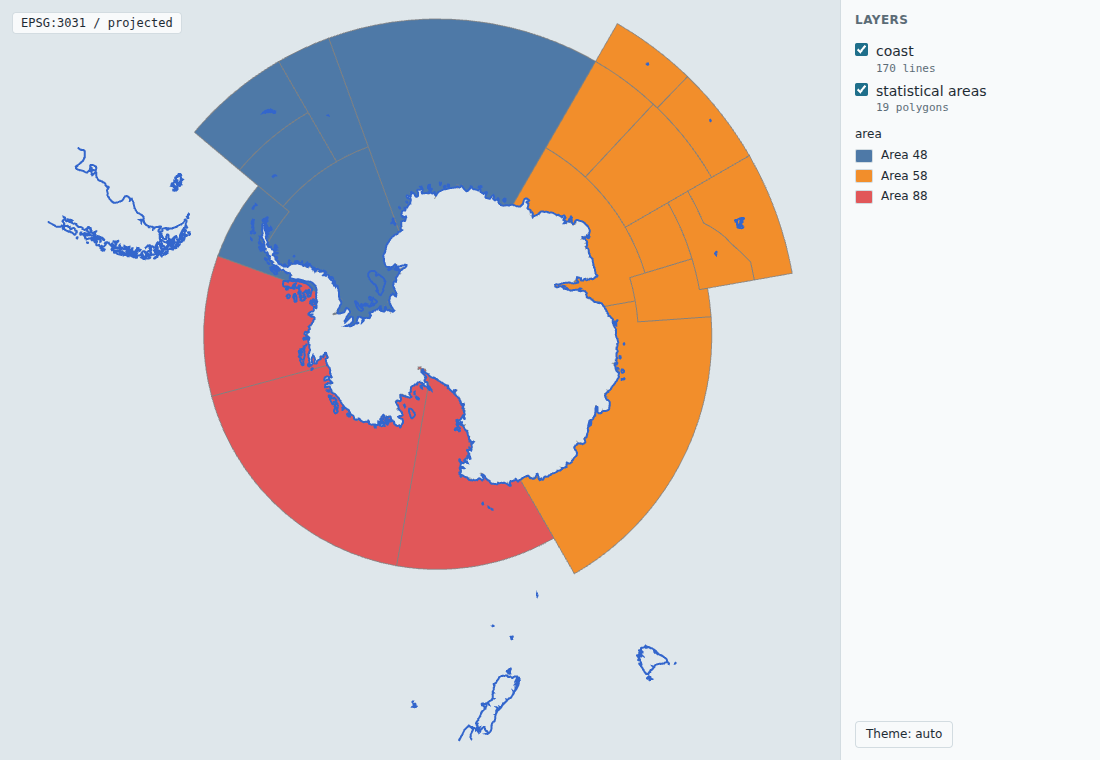
Try it
# install.packages("remotes")
remotes::install_github("allboa/aobview")   # installs aobcore from GitHub too
library(aobview)
areas <- sf::st_read(system.file("extdata", "ccamlr_statistical_areas.geojson",
                                 package = "aobview"), quiet = TRUE)
view(areas, zcol = "GAR_Long_Label")
Get started walks through the examples with live maps you can pan, zoom and click in this site.
What works now
-
view()for sf and sfc points, lines and polygons, and terra rasters and vectors. - Any projected view CRS. Lon/lat data south of 40S is drawn in EPSG:3031 and north of 60N in EPSG:3413;
crs =picks any other. - Remote COGs referenced by URL and fetched by the browser in tiles, and local or in-memory rasters embedded as planned tiles.
- Several layers in one view, with
view(list(...))orview_add(). - Colour by attribute (
zcol), legends, and popups on click.
What is still being worked out
- Seams and the antimeridian in some projections, and tile budgets for large rasters (warnings say so, on purpose).
- Package names, and whether the renderer shares lonboard’s JavaScript stack.
- macOS: CRAN’s gdalraster binary cannot find its PROJ database, so raster views need gdalraster from conda-forge there for now.
Get involved
aobview is one part of allonboard, a set of small repositories in the allboa GitHub organisation. Try a view of your own data and tell us what broke or surprised you: an issue with the code and a screenshot is ideal. Get involved says where each kind of question or contribution goes, and How it fits together explains the pieces.